
FileZilla الميزات
كل الإمكانات التي تجعل FileZilla أكثر عميل FTP مجاني استخداما لسير عمل نقل الملفات الاحترافي.

البروتوكول & File Transfer الدعم
يدعم FileZilla بروتوكولات نقل الملفات الثلاثة الرئيسية المستخدمة في الاستضافة وخوادم المؤسسات. سواء كان خادمك يتطلب FTP العادي أو FTPS المشفر أو SFTP المعتمد على SSH، فإن FileZilla يدير كل أنواع الاتصالات من واجهة موحدة واحدة.
- ● FTP (File Transfer البروتوكول): Standard port 21 connections for legacy servers and shared hosting environments.
- ● FTPS (FTP over SSL/TLS): مشفّر FTP connections using explicit or implicit TLS modes for data-in-transit protection.
- ● SFTP (SSH File Transfer البروتوكول): آمن transfers over SSH on port 22 with key-based or password authentication.
- ● IPv6 support: Full compatibility with modern IPv6 network addressing.
- ● Large file handling: Resume interrupted transfers and support files larger than 4 GB.
Site Manager وإدارة الاتصالات
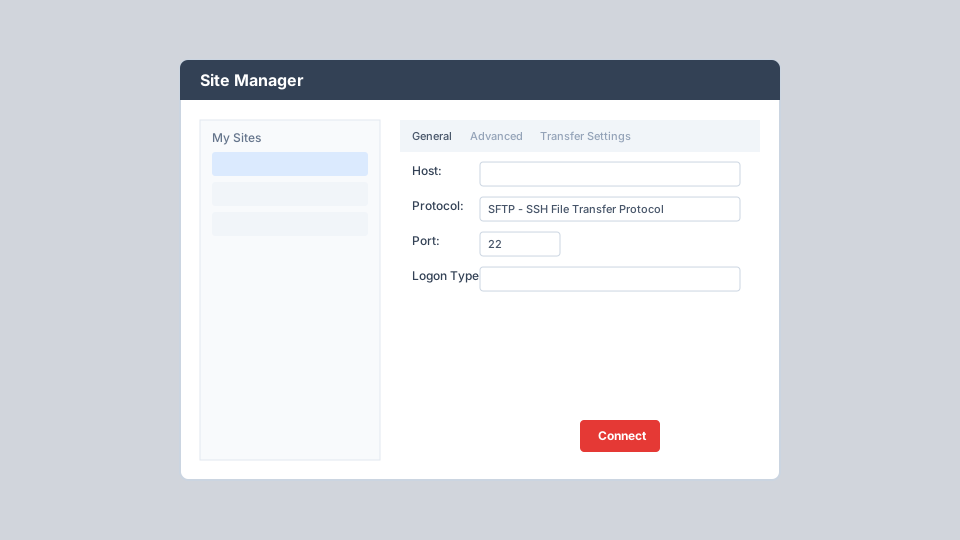
يُعد Site Manager مركز FileZilla الرئيسي لحفظ وتنظيم ملفات تعريف الاتصال بالخوادم. وعلى عكس Quick Connect الذي يتذكر آخر 10 إدخالات فقط، يتيح Site Manager حفظ عدد غير محدود من المواقع بإعدادات تفصيلية لكل اتصال.
- ● Store host, port, protocol, and logon credentials securely per site
- ● Configure default local and remote directories for instant navigation
- ● Set character sets, proxy bypass, and server time offset per connection
- ● Enable synchronized browsing between local and remote directory trees
- ● Organize sites into folders and bookmarks for multi-client workflows
- ● Access via File menu, toolbar button, or keyboard shortcut Ctrl+S
طابور النقل ومراقبة الحالة
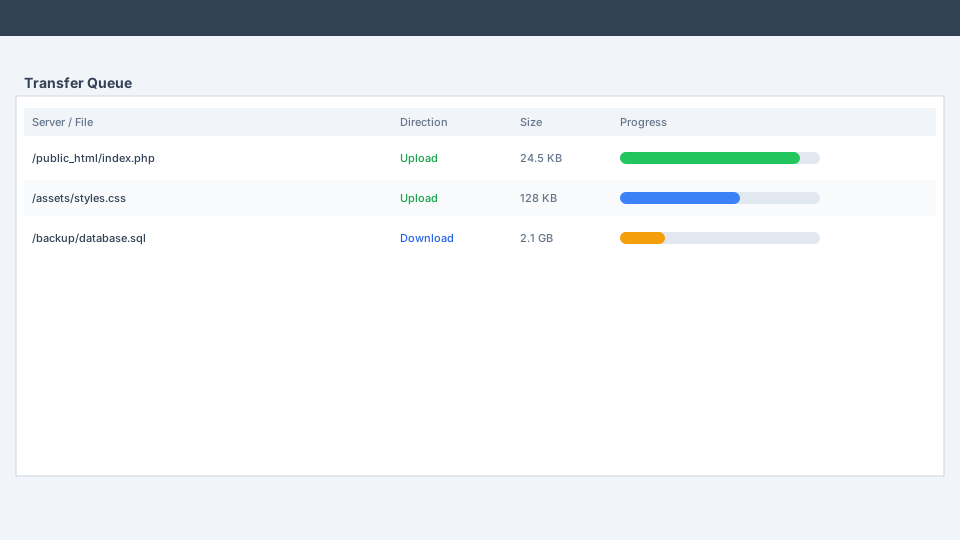
يستخدم FileZilla عدة جلسات FTP في الوقت نفسه: جلسة مخصصة لتصفح الخادم بينما تتولى جلسات أخرى عمليات نقل الملفات النشطة. وتتيح هذه البنية التنقل بين المجلدات بحرية حتى أثناء الرفع أو التنزيل الكبير.
- ● Real-time progress bars with transfer speed, elapsed time, and bytes متبقي
- ● Queue files via drag-and-drop, double-click, right-click, or Add to Queue
- ● Reorder queue priority and pause or cancel individual transfers
- ● Automatic resume of interrupted transfers for reliability on unstable networks
- ● Tabbed browsing to transfer files between multiple servers at once
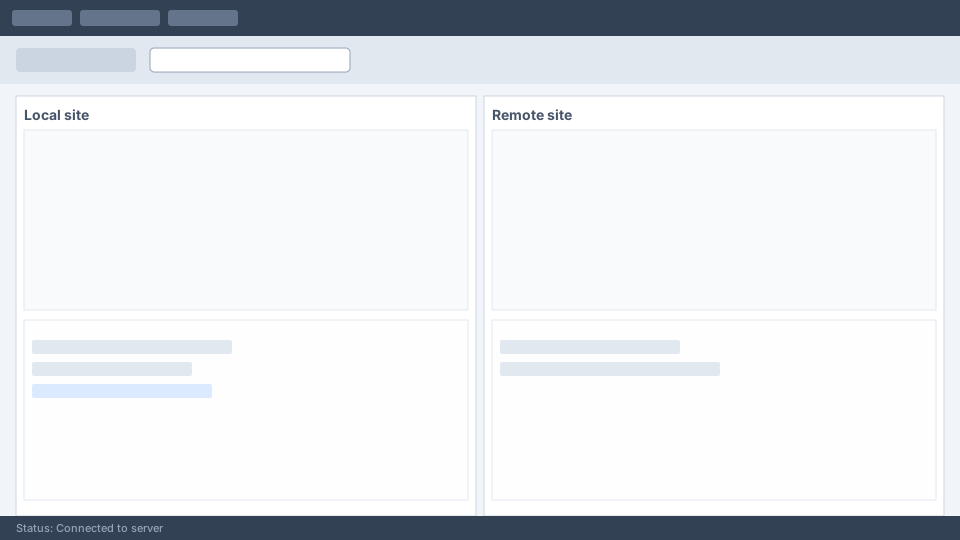
- ● Status log at the bottom of the window reports every connection event
مصادقة وتشفير آمنان
يمكن ضبط الأمان على كل المستويات. يدعم FileZilla عدة أنواع تسجيل دخول وأنماط تشفير لتطابق متطلبات خادمك دون التضحية بالحماية.
Logon Types
Normal (username/password), Account (FTP only), Ask for password, Interactive, and Key file (SFTP SSH key authentication).
Encryption Modes
Configure FTPS with explicit TLS, implicit TLS, or use SFTP for full SSH tunnel encryption of all data and commands.
Proxy الدعم
HTTP/1.1, SOCKS5, and FTP proxy support with per-site bypass options for corporate network environments.
حدود السرعة وتحسين النقل
اضبط سلوك النقل بدقة ليتوافق مع سعة شبكتك وسياسات الخادم. يقلل FileZilla أخطاء انتهاء المهلة ويمنحك تحكما كاملا في استهلاك النطاق الترددي.
- ● Configurable speed limits: Set maximum upload and download speeds globally or per transfer.
- ● Simultaneous connection limits: Restrict parallel connections to comply with shared hosting restrictions.
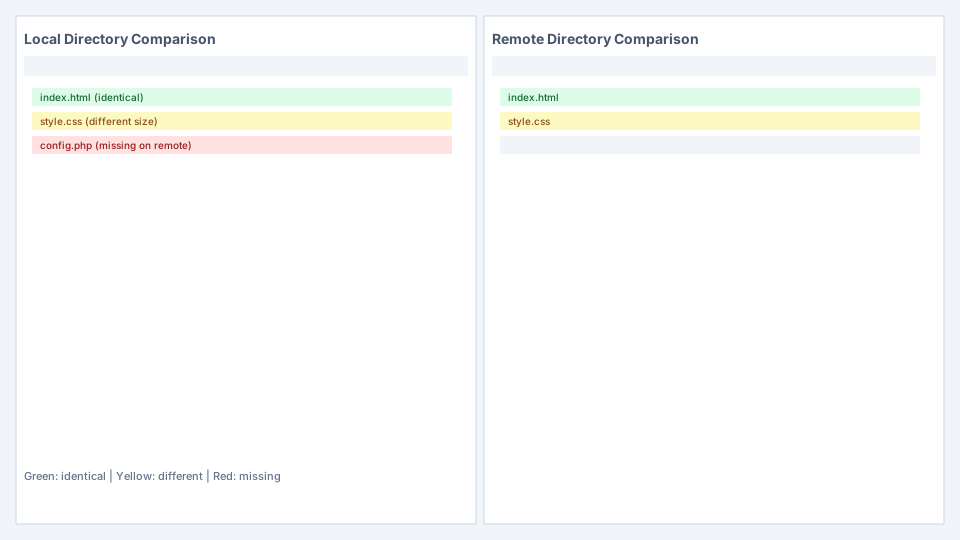
- ● Directory comparison: Compare local and remote directories side-by-side with color-coded status indicators.
- ● Filename filters: Include or exclude files matching specific patterns during transfers.
- ● Remote file search: Search for files on the remote server without manual directory browsing.
- ● Logging to file: Record all transfer activity for audit and troubleshooting purposes.
أدوات الشبكة وتعدد المنصات
يعمل FileZilla أصليا على Windows 8.1 فما بعده و macOS و Linux وأنظمة BSD. ومبني بـ wxWidgets لتجربة متسقة عبر أنظمة التشغيل.
Network Configuration Wizard
Automatically detect firewall and router settings to configure passive/active FTP modes correctly.
Remote File Editing
Edit server files with Notepad or any external editor. FileZilla downloads to a temp file and re-uploads on save.
47+ لغة
متاح بالعربية والصينية والفرنسية والألمانية واليابانية والإسبانية والروسية وعشرات اللغات الأخرى.
Drag & Drop
Drag files between local and remote panes, or directly into the transfer queue for batch processing.